
Interactive experiences

    Interactive walls and installations for events

    Interactive LED and projection walls, touchscreens, body-tracking games and XR zones for events and trade-show stands, built around your brief and run on site by one team.

    • Built around your brief: concept, interaction design and content by our in-house team, no off-the-shelf templates.
    • Touch, camera and body tracking, tablets, LED and projection walls: the input and the screen chosen for the goal.
    • Hardware, software and on-site operation from one team, anywhere in Poland and across Europe.
    • Designed to bring visitors to the stand, capture leads and create content people share.
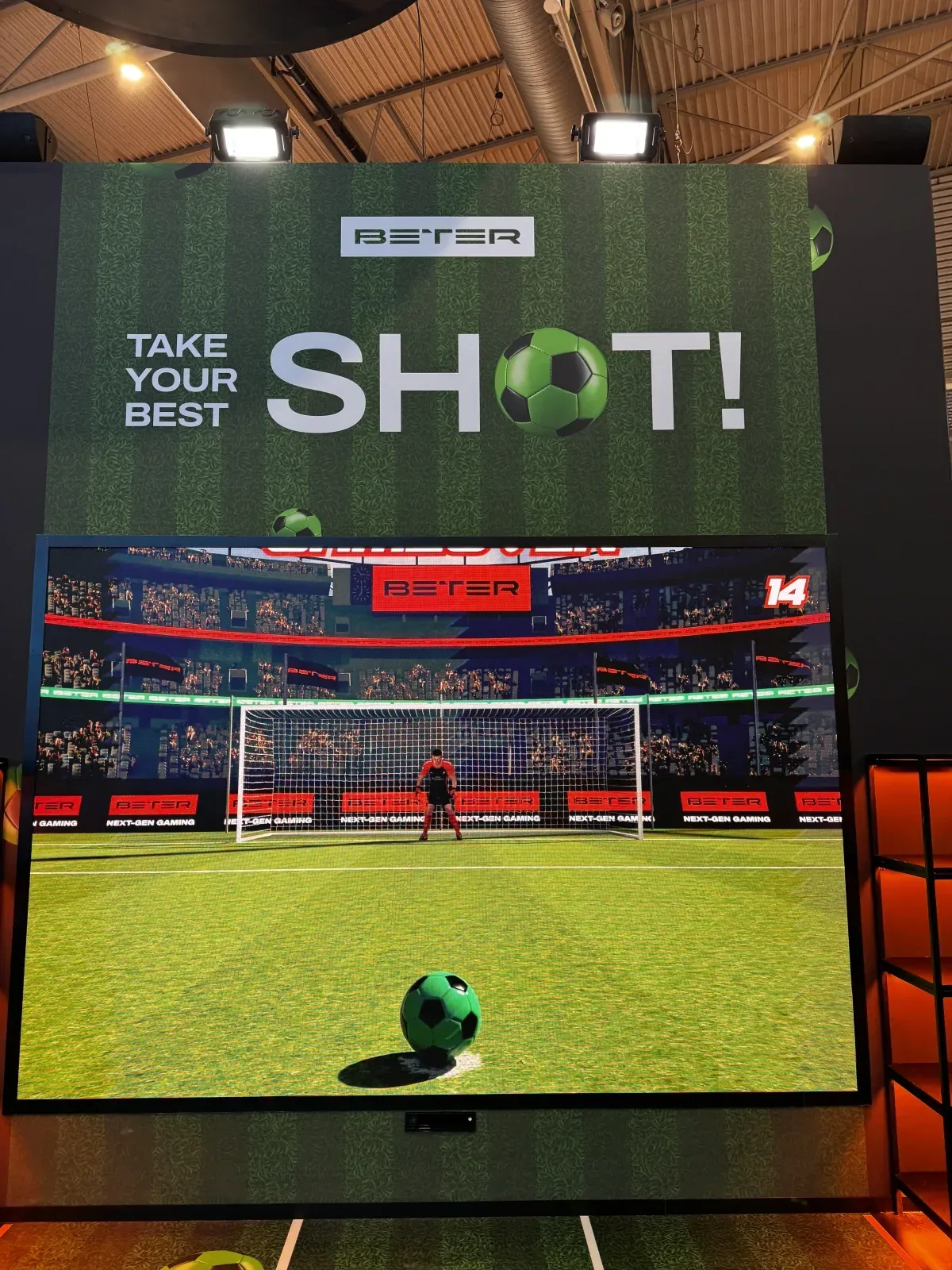
    Penalty simulator for an iGaming brand

    Interactive walls for events, built around your brief

    An interactive wall turns a screen into something visitors play with, not just watch. It reacts to touch, to a body moving in front of it or to a tablet in someone's hand, and it runs content made for that one event. REX Lab designs and builds interactive installations for events, exhibitions and trade-show stands, then installs and runs them on site. We start from your goal, not from a template: footfall on the stand, leads, explaining a product or content that people share.

    What an interactive installation can be

    • Interactive LED walls. An LED wall with content that responds to the people in front of it. LED stays bright in daylit halls, and outdoor IP65 screens work in the open air. See LED screens.
    • Projection walls and objects. 4K laser projectors turn a wall, a floor or a piece of scenery into the interactive surface. When the image has to follow the shape of a building, a stage set or an object, mapping becomes a layer of the project; read how we work as a projection mapping company.
    • Touchscreens and tablets. Catalogues, quizzes, configurators and lead forms on Avtek 55" and iiyama 32" touchscreens or iPad Air 13" tablets. See touchscreen hire.
    • Camera and body tracking. Cameras and depth sensors read a visitor's position and gestures, so the wall reacts when someone walks past, waves or kicks a ball. See body tracking experiences.
    • Branded games. Our interactive games for events can be branded, given custom mechanics or developed from scratch, and run on touchscreens, with camera tracking or on an LED wall.
    • VR, AR and XR zones. VR stations on our own Oculus Rift headsets, AR experiences and XR photo and video zones. See XR video zones.

    Interactive exhibition displays and trade-show booths

    On an exhibition stand, an interactive booth has a few seconds to stop someone walking down the aisle. A wall that reacts to movement or a short game with a leaderboard does that job; a touchscreen or tablet then takes the visitor to product details or a lead form. We have worked on iGaming trade-show stands at ICE, SiGMA Europe, SBC Summit and iGB Live, and we also work for stand builders, including unbranded, as part of their team. See trade show AV.

    In interactive exhibitions and museums, the same tools serve a different goal: explaining a subject through touch and movement along the visitor route. For brand activations and corporate events, an immersive experience can combine LED, projection, sound and light around one interaction.

    Hardware, software and on-site operation from one team

    One team covers the whole chain, so you do not have to connect a game studio, an AV company and a content agency on the day.

    • Concept and interaction design: what the visitor does, how long it takes and what the wall shows when nobody is playing.
    • Content made in-house: our motion designers produce the graphics, 3D and animation, sized to the actual screen.
    • Software: games, web apps and control panels, with media playback on Resolume and TouchDesigner. When the project needs it, we connect the installation to your CRM, email platform and LED screens; see event apps.
    • Hardware: LED walls, 4K laser projectors, touchscreens, tablets, cameras and the control computers that run them.
    • On site: delivery, installation, calibration in the real light and space, testing and operation during the event. Every project has a technical lead; operator shifts are billed separately.

    Interactive installations we have delivered

    • Penalty simulator – Filosofia: a body-tracking penalty kick game for an iGaming brand that turns visitors into leads and social-media content.
    • Neboreka – Razman: an interactive exhibition with body-reactive walls.
    • IGB London Boomerang: interactive XR solutions with touch and iPads, including web interfaces and an XR photo booth that sent results by email.

    Start with a short brief

    Tell us the goal, the event and dates, the space or stand plan, the expected visitor flow and any brand material. We come back with questions, a proposed approach and a net quote that lists content, software, equipment and operator shifts separately. Our office and warehouse are in Warsaw; we deliver and install anywhere in Poland, and across Europe for larger productions and trade shows. Book equipment at least one week ahead; custom development needs more time, depending on the scope. Send us your brief.
    What’s included

    Built for

    • Event producers and agencies
    • Marketing teams responsible for brand activations
    • Museums, interactive exhibitions, retail experiences

    Design

    • Concept and UX for interaction
    • Content production (3D, motion graphics)

    Software

    • Games, web apps, control panels

    Hardware

    • LED, touchscreens, cameras, sensors integration

    Services

    • On-site support and maintenance

    How we work

    1. Brief

      Define goals: engagement, leads, education

    2. Concept

      Prototyping and interaction design

    3. Development

      Content, software and hardware build

    4. Installation

      On-site setup and calibration

    5. Operation

      Running the installation during the event

    Equipment for this service

    Related case studies

    See this service in real projects.

    Explore services from the same category or used together in our projects.

    Questions & answers

    Ready to build something impressive?

    Tell us about your project — we'll recommend the right mix of technology and creative services.

    Start a project
    All services

    Planning resources

    Applications and project planning

    Touchscreen or tablet: which works better on an exhibition stand?

    Use a large touchscreen for a shared, visible experience and tablets when several visitors or staff need independent sessions. The deciding factors are the task, application, visitor flow and available space.

    How to plan a VR zone: space, staff and visitor flow

    Plan a VR zone as a sequence of welcome, preparation, experience, exit and equipment reset. The headset's interaction area is only one part of the space and only one part of the time needed for each guest.

    How to choose touchscreen size and position for an event

    Choose a touchscreen by testing the visitor's complete task at the proposed height and angle. A larger image helps spectators, but controls must remain readable, reachable and comfortable for the person using it.

    Standalone VR or a PC-based system for an event?

    Choose the platform that runs your approved experience reliably, then compare the complete station. Standalone operation reduces dependence on a separate computer; PC VR adds a computer and connection path that must be prepared and supported.

    How to design an interactive catalogue visitors can use

    Organise an event catalogue around a visitor's decision: find a relevant product, understand the difference and choose a next step. A touchscreen should not require people to learn your internal product database.

    How to brief a museum multimedia installation around the visitor journey

    Give each multimedia point a distinct interpretive job, then connect the points through a route that also works when visitors skip a screen or a device is unavailable. The brief should cover the exhibition story, access, sound and daily operation together.

    How to plan a temporary interactive zone in a shopping centre

    Plan the zone as a short staffed activity with a clear arrival, waiting point, participation step and exit. The screen, app and daily routine should support that route without making the shopping-centre walkway part of the experience.

    What determines the cost of an interactive kiosk?

    Price the complete visitor experience: screen and mounting, application, content, integrations, testing and operation. Two kiosks with the same display can require very different work behind the interface.

    Ready-made VR content or custom development for an event?

    Use existing VR content when its actual experience fits the purpose and event use is authorised. Consider custom development when the message, product interaction or reuse plan cannot be achieved through a suitable existing experience.

    Tracking and interactive activation guides

    Plan visitor interactions, choose a control method and understand participation capacity and measurement before selecting sensors.